



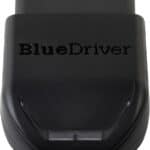




If you want to diagnose your car without carrying around a bulky professional scan tool, the BlueDriver OBD2 Scanner Bluetooth is one of the most interesting options available. Instead of having its own screen, BlueDriver connects to your smartphone through Bluetooth and uses the BlueDriver app to display diagnostic information.
What makes BlueDriver different from many inexpensive OBD2 scanners is the amount of information it can provide. Along with reading and clearing check-engine codes, it offers features such as live data, freeze frame information, Mode 6 testing, smog readiness checks, and enhanced diagnostics on supported vehicles.
In this BlueDriver OBD2 Scanner Bluetooth review, we’ll look at its features, ease of use, vehicle compatibility, advantages, limitations, and whether it is a good choice for DIY car owners.
What Is the BlueDriver OBD2 Scanner Bluetooth?
The BlueDriver is a Bluetooth OBD2 diagnostic tool designed to work with Android and iOS smartphones. The small adapter plugs directly into your vehicle’s OBD2 port, while the BlueDriver app provides the interface for scanning and diagnosing the vehicle.
The OBD2 port is generally located underneath the dashboard and has been required on cars sold in North America since the 1996 model year. BlueDriver says its scanner works with 1996 and newer cars, SUVs, and light trucks sold in North America, including many gasoline, diesel, and hybrid vehicles.
The app is free to download, while the BlueDriver OBD2 Scanner Bluetooth is purchased separately. There are also no subscription fees required to access the scanner’s main features.
BlueDriver Features
One of the biggest reasons people consider BlueDriver is its feature list. This isn’t simply a basic code reader that tells you why the check engine light is on.
The scanner can read and clear diagnostic trouble codes, display live vehicle data, show freeze frame information, check emissions readiness, and provide Mode 6 test results. It can also provide enhanced diagnostics for certain vehicle manufacturers.
The Repair Reports feature is particularly useful for DIY owners. Instead of giving you a code such as P0301 and leaving you to search the internet, BlueDriver can provide possible causes and reported fixes associated with your specific vehicle and trouble code.
According to BlueDriver, its repair information is based on millions of real world repairs.
YouTube video from https://www.youtube.com/@chrisfix
Enhanced Diagnostics
Basic OBD2 scanners primarily concentrate on emissions related engine diagnostics. BlueDriver OBD2 Scanner Bluetooth goes further on supported vehicles by providing access to additional systems.
Depending on the vehicle, enhanced diagnostics can include systems such as ABS, airbag/SRS, transmission, and TPMS. Supported manufacturers include Ford, GM, Toyota, Honda, Nissan, Mazda, BMW, Volkswagen, Mercedes Benz, Hyundai/Kia, Subaru, and others, although coverage varies by make, model, year, and market.
This is an important point when considering BlueDriver: not every vehicle receives the same enhanced diagnostic coverage.
The basic BlueDriver functions can work on vehicles with an OBD2 port, but the additional manufacturer specific features depend on the vehicle.
For that reason, it’s a good idea to use BlueDriver’s compatibility checker before purchasing.
Using the BlueDriver App
The BlueDriver app is a major part of the overall experience. Since the scanner doesn’t have its own screen, your smartphone does all the displaying and navigation.
Getting started is relatively straightforward. You turn on Bluetooth, install the BlueDriver app, plug the sensor into the OBD2 port, turn the ignition on, and establish the connection through the app. BlueDriver supports both iOS and Android devices.
Once connected, you can select the diagnostic functions you want to use.
For beginners, this smartphone based approach can be easier to understand than the small monochrome screens found on many inexpensive handheld scanners.
The app also provides explanations and repair information, which can make diagnostic codes less intimidating for people who don’t work on cars every day.
Reading and Clearing Trouble Codes
Reading diagnostic trouble codes is one of the main reasons to purchase an OBD2 scanner, and BlueDriver handles this particularly well.
You can scan the vehicle to identify stored and pending codes and, where appropriate, clear codes after addressing the underlying problem. BlueDriver OBD2 Scanner Bluetooth also supports enhanced codes on compatible vehicles.
For example, if your check engine light comes on, BlueDriver can help you identify the diagnostic code before you take the vehicle to a repair shop.
However, it’s important to remember that an OBD2 code doesn’t automatically tell you which component needs to be replaced. A code can point toward a system or problem area, but additional testing may still be necessary.
This is where BlueDriver’s Repair Reports and live data functions can be useful.
Live Data and Mode 6
The BlueDriver OBD2 Scanner Bluetooth can display live information from the vehicle while the engine is running. Depending on what your vehicle supports, you can monitor parameters such as engine temperature, fuel trims, oxygen sensor information, and other sensor readings. The app also supports interactive graphing for multiple PIDs.
For more experienced DIY mechanics, Mode 6 can be another useful feature.
Mode 6 provides results from certain onboard diagnostic tests and can help identify problems such as misfires or monitor related issues. BlueDriver’s compatibility information notes that Mode 6 can include misfire information on supported 2008 and newer vehicles.
These features give BlueDriver considerably more diagnostic capability than a simple code reader.
Repair Reports
Repair reports are arguably one of BlueDriver’s strongest selling points.
After reading a diagnostic code, the app can generate information about possible causes and reported fixes for the particular vehicle and code. This can give DIY owners a better starting point when deciding what to inspect next.
This doesn’t turn the BlueDriver into a professional mechanic, but it can make troubleshooting much more practical.
For someone who sees a check engine light and doesn’t know where to begin, having vehicle specific repair information in the same app can save considerable research time.

Pros of the BlueDriver OBD2 Scanner Bluetooth
One major advantage is its wireless design. You don’t have to sit with a cable running from the OBD2 port to a handheld scanner.
The smartphone interface is another positive. Most people are already comfortable using their phones, and the BlueDriver app provides more screen space and graphical information than inexpensive handheld scanners.
Another advantage is the enhanced diagnostic capability available for supported vehicles. Being able to access systems beyond the basic engine codes can make the scanner much more useful for DIY maintenance.
The lack of subscription fees is also appealing. BlueDriver states that its purchase does not require additional subscriptions or add ons for the scanner’s features.
Finally, the Repair Reports provide useful guidance instead of simply displaying a code and leaving you to figure everything out.
Cons of the BlueDriver OBD2 Scanner Bluetooth
BlueDriver isn’t perfect.
The biggest limitation is that enhanced diagnostics aren’t identical across every vehicle. A feature available on one make or model may not be available on another. Checking compatibility before purchasing is therefore important.
Another limitation is the dependence on a smartphone. Since the scanner doesn’t have its own display, you’ll need a compatible phone with the BlueDriver app installed.
Bluetooth connectivity can also introduce an additional step compared with a traditional wired scanner. Recent versions have focused on improving connectivity and hardware design, but the smartphone based setup is still something buyers should consider.
BlueDriver is also primarily a diagnostic scanner rather than a full professional service tool. If you need advanced bidirectional controls, programming, coding, or specialized dealership level functions, you may need a considerably more advanced scan tool.
Is BlueDriver Easy to Use?
For a Bluetooth scanner with this many functions, BlueDriver is relatively user friendly.
The basic process is simple: plug the device into the OBD2 port, connect your smartphone, open the app, and scan the vehicle.
The app’s repair reports and explanations are particularly helpful for beginners because they provide context instead of presenting diagnostic codes without any guidance.
More experienced users can also take advantage of live data, Mode 6, freeze frame information, and enhanced diagnostics.
That makes BlueDriver suitable for a fairly wide range of users, from someone trying to understand a check engine light to an experienced DIY mechanic performing more detailed troubleshooting.
BlueDriver vs. Basic OBD2 Scanners
A cheap OBD2 scanner can be perfectly adequate if all you want to do is read a basic check engine code.
BlueDriver is aimed at people who want more information.
Its combination of smartphone connectivity, enhanced diagnostics, live data, repair reports, freeze frame information, Mode 6, and emissions readiness information gives it a broader range of uses.
The trade off is that you’re paying more than you would for a basic code reader.
Whether that additional capability is worthwhile depends on how often you work on your vehicle and what you expect the scanner to do.
Final Verdict
The BlueDriver OBD2 Scanner Bluetooth is a strong option for vehicle owners who want more than a basic code reader.
Its biggest strengths are the easy to use smartphone app, wireless Bluetooth connection, detailed diagnostic information, repair reports, live data, and enhanced diagnostics on supported vehicles. It also doesn’t require a recurring subscription for its main features.
The main thing to remember is that enhanced features vary between vehicles. Before purchasing, check your exact year, make, model, engine, and original sales market to confirm which functions are available.
Overall, BlueDriver is a good choice for DIY car owners who want a convenient way to investigate check engine lights and perform more advanced diagnostics from their smartphone. It won’t replace a high end professional diagnostic tablet, but for many everyday vehicle owners, it provides a useful balance of features, convenience, and usability.


